Hacker Newsnew | past | comments | ask | show | jobs | submitlogin
Ask HN: How to become good at Emacs/Vim?
42 points by mudrockbestgirl on Oct 15, 2022 | hide | past | favorite | 82 comments
I've tried switching from IDEs like VSCode to Emacs (with evil mode) a few times now, but I always gave up after a while because my productivity decreases. Even after 1-2 weeks it's still not close to what it was with VScode. That's frustrating. But when I watch proficient people using these editors I'm always amazed at what they can do, and they appear more productive than I am with VSCode. So with enough effort it should be a worthwhile investment.

I think my problem is the lack of a structured guide/tutorial focused on real-world project usage. I can do all basic operations, but I'm probably doing them in an inefficient way, which ends up being slower than a GUI. But I don't know what I don't know, so I don't know what commands and keybindings I should use instead or what my options are.

How did you become good at using these editors? Just using them doesn't really work because by myself I'd never discover most of the features and keybindings.


A couple of suggestions (in no particular order, and from an ex-Emacs/Xcode/Jetbrains/VSCode and current nvim user):

1. Don't. There's no need to 'switch'. There are marvellously 'productive' developers using every editor under the sun, and neither the quality nor quantity of their work is strongly related to their choice of editor. There are world-class developers who do everything in a vanilla Sublime Text. Others who have a fully tricked-out emacs who dream in org mode. Some use a mouse in one hand and do keyboard shortcuts in the other. None of it matters much. Ignore antiempirical self-attestations to the contrary - they're entertaining but informationally worthless. If self-attestations were relevant, then everything (from quack medicines to cult healing methods to levitation) would be true, because everything has more utterly self-convinced dataless self-attestations than you could absorb in all a bodhisattva's recalled lifetimes. [all scare quotes intended].

2. Do. Emacs and vim/nvim are great and will serve you well if one matches your preferences. Pick one using your preferred criteria, and commit to it for a period. Your 1-2 weeks just isn't enough - I'd say 2 months at least. Put that commitment in your calendar. If it slows you down too much for practicality to start with, limit its use (to an an hour a day, or to a side project), but stick with it for the full period regardless. In the first week or two, go through enough basic tutorials to be able to do essential editing with their basic keybindings without plugins. With reasonable fluency established, just keep a note in which to jot down what's missing compared to your IDE, and pick them off, one-by-one, over time. Sort the list once a week to keep it fresh, and just pick the next item to configure/learn. Get fluent with each new item before moving on to the next.


Reinforcing #1: It's amazing how productive you can be if you're creating things instead of endlessly trying, configuring, and comparing editors.


I mean, you're going to be programming for the rest of your life, right? I put a bunch of time into customizing vim... god, I think it was 15 years ago? Whenever this comes up, people make it sound like you are somehow going to be doing that every single day for the rest of your life or something... and then, awkwardly, I tend to see them screwing around constantly with some new IDE-of-the-week that crashes constantly and slows them down at every turn gloating about how they "saved time" by not spending a small amount of time forever ago to figure out what the hell they actually wanted :/.


> I tend to see them screwing around constantly with some new IDE-of-the-week that crashes constantly and slows them down at every turn gloating about how they "saved time" by not spending a small amount of time forever ago to figure out what the hell they actually wanted

This is just as much a caricature as the one you're objecting to. People do good work using all of the available tools. Some use more than one! There are people who like both emacs and IntelliJ! We really don't have to tribalize over every little choice people make.


I'm totally cool if you want to use IntelliJ. I'm somewhat less cool if you are telling me how awesome IntelliJ is this year after trying to get me to use Eclipse on your last project but are now looking at VSCode as an alternative because you are sick of switching between this stack and Xcode and PyCharm after you stopped just trying to use Sublime for everything... and I certainly lose all sympathy when these same people actively defend this insanity by saying they don't think it makes sense to "waste time" "over-engineering" their text editor setup.

Like, if you want to tell me "I use nothing but notepad, and I'm a god at it" I'm going to be "holy hell yeah, I want to feast my eyes upon this marvel"... but, first off, I'm betting at that point you are going to have gotten really good at using notepad, along with all of the little warts of how it interacts with Explorer... and second off, the people who are coming out always to bash on the people who bother to learn and optimize their tools to prepare for a lifetime of software development generally aren't people who simply chose a different tool.


And then there's the majority of devs, like me, who did not spend months forcing themselves to actually make vim/emacs into an IDE and, at the same time, who suffer from no negative effects with one of those "IDE-of-the-week" (JFYI, that's not a thing). Intellij, Pycharm, and VSCode are all stable and fast. I don't think I've had neither of those crash on me in the past three years.

You're laying out a false dichotomy.


I'm not laying out a false dichotomy, I'm laying down two stacked arguments, and you are welcome to disagree or agree with each of them separately (and it isn't even clear to me that you disagree with the first one--about how that supposedly-large cost is amortized over a lifetime of development--as you seem to have been so distracted by the second).

(And yes, IDE-of-the-week is definitely a thing. The shear number of different one-off text editors and IDEs for various language stacks I've seen people try to get me to use over the past 25 years is staggering.)


There's churn in the Vim world too. Plugins and plugin managers change. For example, with Neovim, Packer and Mason are apparently what's good to use now, and Mason literally came out 3 months ago. I guess if you don't use many plugins (and aren't trying to make Vim a full fledged IDE) then it's fine, but if you are, there's a lot of churn to go through.


What I've found over the last 2 jobs/3 laptops is that I'm quite comfortable starting working and being productive with vi, and then over time I start setting 'nocompatible' when I need some feature from Vim, and then some weeks in add a vimrc/init.vim.


There's approximately zero churn in Emacs. Moved up four major versions a few years ago and I think I had to regigger one line in my config, out of a config of over 2000 lines.


I agree with you, and that's one of the reasons I wanted to try switching away from VSCode. It has been pretty good, but sometimes it's quite slow and does who-knows-what in the background, and then I check my CPU and memory usage and yep, it's eating 32Gi of ram. For what? Editing text? Compiling unncessary stuff when I don't want to compile? Then I restart it, like the good old Windows 95 days, and it's all good again. Probably something with the LSPs, but who knows. The point is, it's a lot of magic in those plugins, and I don't like magic because at some point the extra cost of debugging the magic is not worth it. I'd rather have a system that properly surfaces the complexity even if that means it takes longer to learn.


Whether you call it over-engineering or procrastination, customizing an editor is a delicious waste of time.


I'm certainly not knocking it. I have enjoyed it in the past, particularly with emacs. But it's an activity which some enjoy for its own sake and some don't. It's just not a necessary condition for becoming a 'productive' developer. Those who do enjoy it to the point of writing some of the great open source plugins available, do the rest of us a terrific service.


Just as you, I certainly don't relate productivity and editor config.

My co fig now is really simple: I rely on other's work: I find powerline-10k + LunarVim to make for a more than good enough terminal environment.


I can only confirm this. Only change if you feel real need and progress with another tool. Learning a new IDE takes time. I've been using Emacs for over 20 years and I'm still discovering new features. The goal is not to become an Emacs superhero but to gain confidence and efficiency. Some features may seem useless to you until you have a suitable use for them. For example, for a long time I ignored Emacs' natural keyboard shortcuts for moving the cursor, preferring to use the arrow keys until I felt the need to use them and felt that I was doing my job more efficiently.

I tried VS Code as well but did not enjoy the experience. Back to Emacs with which I have too many habits and a long love affair. I also use Atom a bit for some tasks but it's more rare.

You also don't need to configure your IDE from the start. It's a bit of a thankless task but not that difficult or incomprehensible. It took me a few years before I started messing with my Emacs configuration. The advantage is that it is portable and I can find my environment on any computer just by copying a folder.


Why did you switch to nvim from emacs?


Well I don't use the 'switch' term - cliches cloud thought, and I've only at some points in my programming life used a single editor for everything, and for me it's been more a pragmatic journey than anxious 'switch'. Also I don't always work as a programmer - so sometimes, returning to the field after a few years away, I start afresh with new tools.

I did once use emacs extensively. I stopped because at the time I moved almost exclusively into iOS work, which mostly meant XCode. I disliked that enough that I tried and enjoyed the only real alternative - Jetbrains' AppCode. So then when I moved on again to non-iOS work I had fallen for the Jetbrains approach, so mostly used IntelliJ. I did have one small spell again with emacs, when writing some clojure (for which it's a good fit), but found it overwrought for my more recent taste.

But all this time I had used vim for small on-off and in-terminal edits, and mostly used vim keybinds in other editors. Anyway, via a couple more shifts (including using VSCode for a while), the advent of LSP and treesitter really makes neovim close enough to matching IntelliJ's features for my purposes. I just like neovim and its ecosystem, and it works well enough for me. But so would emacs or IntelliJ or VSCode or vim or emacs. I probably make several choices a week far more significant than what text editor to use.


Emacs suggestions in no particular order:

Emacs manual is great, at least skim it to see what's out there in stock Emacs.

Look at what Spacemacs provides in packages: these are most likely the most popular extensions. You don't need to use Spacemacs, but this is the closest to the curated list of useful packages Emacs has (would be glad to be proven wrong - is there a better list?), so at least reading through it will give you an idea what could be added to Emacs to make it more useful.

LSP support is a gift to all non-mainstream-IDE users. Use it.

"Mastering Emacs" is a good book: https://www.masteringemacs.org/book, I wish it was available when I started.

Be aware that many Emacs packages are terribly outdated and not very good to start with. Don't try too hard to make work something that sounds good on paper: if it doesn't work, or cumbersome to configure or use then look for alternatives. Over time I got rid of most of the packages I tried.

Learn some Elisp. It's not a large language, and knowledge of it makes making Emacs lifestyle improvements trivial.

P.S: It helped that at 1998 IDEs were too slow to run on a computer I could afford, so I stick to Emacs and eventually got better at it.


An addition: you do not _have_ to do everything Emacs-way. Some of "Emacs way" is obsolete, some of it is different from mainstream due to technical limitations of bygone ages or due to the effects of path dependence. Try everything, but feel free to discard things that don't improve your workflow.

For example, I have Command-O bound to "open file" and Command-S bound to "save file", because I don't want to remember another set of obscure hotkeys. I have Command-T for "open me a new blank file", because that's browsers' hotkey.

I use Control-[FBNP] and derivatives because they also work in shells and in majority of edit fields in mac OS. Otherwise I would probably stick to cursor keys.


Yes, LSP Mode for Emacs is great: https://emacs-lsp.github.io/lsp-mode/ LSP has saved a lot of redundant effort in supporting IDE features on many editors: https://en.wikipedia.org/wiki/Language_Server_Protocol


I've written about Emacs for, hm, nearly 13 years [1]. My recommendation is picking one thing you want to start doing in Emacs, and then focus on getting good at that.

Maybe that's doing your shell/terminal work in Emacs. Perhaps it's note taking and organising your thoughts, tasks, and agenda. Perhaps email. Maybe it's small shell scripts at first, before you move on to larger tasks, like full-on programming like you do in your daily job (I am guessing.)

If you try to do everything, while trying to remain productive at your job, you'll probably abandon Emacs.

I've written a book on Emacs, which will definitely teach you Emacs. But it's not a _requirement_ to read a book on it. The manual and tutorial and both good places to start if you'd rather do it for free.

[1] https://www.masteringemacs.org/


I dabbled with neovim on and off for a while - kind of following the same logic as you, wanting to be like many people I saw on Youtube. It never really worked since I was really comfortable with my existing workflow - vscode + iterm and "swiping" between screens on macOS. I was super-fast with the Macbook trackpad with its sensitivity turned up to the max.

It finally clicked when I started a job where I had to use a windows laptop with a linux VM as my primary computer. I found that using vscode either within the VM or over "Remote-SSH" from windows was severely cramping my productivity. So I switched to NeoVim+Tmux cold turkey (SSHing into VM using "Windows Terminal"). I set up some shortcuts that made sense for me somewhat from vscode (e.g. Alt+<number> for switching "tabs", alt+hjkl or alt+arrow keys to switch between tmux panes etc.). Within a couple of weeks I was back to my old level of productivity.

My usual setup has neovim on the left and a terminal in the right pane. Adding more panes vertically or horizontally is super easy as well. This may not be the most optimal setup, and there are still a few pain points from time to time - particularly with the LSP/"intellisense" stuff. But it works for me.

Oh and when I am coding on my MacBook Pro at home, I still prefer to use vscode + iTerm.

Some resources that helped:

"Practical Vim" by Drew Neil. I didn't read it cover to cover but I have scanned through it enough to pick up the important stuff.

https://www.youtube.com/watch?v=iF4RvQq6yU0

https://www.youtube.com/watch?v=GUptUQGrJLE

https://www.youtube.com/watch?v=wlR5gYd6um0


I think what I did was just force myself to use it and if there was something in particular I wanted to do I would look it up, or if there was something that I was doing repeatedly I would try to find how to do it in the lowest number of keystrokes.

After I got the basic movements down (doing vimtutor if I needed refresher), then I would watch videos on youtube of peoples favourite keybinds, or lesser known keybinds. A lot of times this would open up a lot of things I didn't realize was possible.

Eventually I started to understand the vim "language", and things became natural to the point where I don't even really think about the keybinds I'm using, it just happens.

It was definitely a struggle at first though. If I could go back and be a TA again for intro to programming labs I would have found a way to give people extra credit for learning vim. The best time to start putting in the work is now, you'll thank yourself later.

If you program in C, google "Ctags" and the associated keybinds and vim command line argument (-t). Most useful utility for me personally.


This is similar to my experience. I forced myself to use vim on non-coding text files first. Just the basics of vimtutor. Only later, after learning to organize my vimrc configs, and adding useful plugins, did I use vim for coding.


Why?

No, seriously, why do you think you have to switch if you are productive with VSCode?

I used to be all in with Vim and then Emacs many years ago. I can manage pretty well with both to this day. But I moved onto VSCode a few years ago and… it’s very nice. It just works out of the box. I have tried to move back to Emacs for example, but the lack of trivial and good remoting features and the lack of great LSP integration are hard to overcome.

Nowadays I still use vim for quick or repetitive edits (learn how to record and replay macros; they are a game changer), but otherwise spend all of my time in VSCode with its Vim mode enabled.

And to be fair, I only use the Vim mode in VSCode because I moved from macOS to Windows and I could not stand the Windows native shortcuts.


I remember I found setting up remote connections for VSCode harder than emacs.

isnt emacs just M-x ssh … and ure done?


>How did you become good at using these editors? Just using them doesn't really work because by myself I'd never discover most of the features and keybindings.

I used Vim (GVim to be specific) as part of my job in a semiconductor industry. Everybody in our team used it and we'd help each other. My recollection is not 100% sure, but I think nobody knew how awesome user manuals were (start with vimtutor and then go through `:h usr_toc.txt` https://vimhelp.org/usr_toc.txt.html a few times).

I've also collected a list of Vim resources here: https://learnbyexample.github.io/curated_resources/vim.html

For Emacs, check out https://www.emacswiki.org/emacs/SiteMap


A document with notes on the software tool https://westurner.github.io/tools/#vim :

- [x] SpaceVim, SpaceMacs

- [ ] awesome-vim > Learning Vim https://github.com/akrawchyk/awesome-vim#learning-vim

- [x] https://learnxinyminutes.com/docs/vim/

- [ ]

  :help help
  :h help
  :h usr_toc.txt
  :help noautoindent
- [ ] https://en.wikibooks.org/wiki/Learning_the_vi_Editor/Vim/Mod... :

  :help Command-line-mode
  :help Ex-mode
- [ ] my dotvim with regexable comments: https://github.com/westurner/dotvim/blob/master/vimrc


I use emacs with evil and been using it for over a decade now. However, I use VSCode for web development and Rider for game development as the integrations are superior with vim extensions for those IDEs. What you are looking for is a set of principles that make theses editors better. You can take baby steps towards it and 1 - 2 weeks is very limited time if you want to change your editing style (It's like learning a new language).

1. Modal editing (VIM / Evil): Install vim extension pack[1][2][3] for VSCode. This should give a good starter pack.

2. Practice:

   - Disable the arrow keys using keymapping in VSCode or with a keyboard customization (s/w or h/w).
   - Disconnect the mouse
   - Practice long writing / code editing sessions where your productivity doesn't matter. You are learning.
   - Start with simple navigation (hjkl, go to line)
   - Use numeric prefixes
   - Begin using text manipulation commands (yi" or di> for  example)
   - Use normal mode keys for window navigation (spc + w + h for example)

   Once you get comfortable with this you should already see a decent leap in comfort/experience and almost zero mouse usage.
3. Next install emacs with a configuration repository[4]. Most of your practice in VSCode vim should apply almost directly.

4. With emacs, you have a vast operating surface. You can choose to use it just as your editor or you can use it as an operating system: email, calendering, note taking, calculations, twitter, rss, text based browser, file manager, http request playground etc. Org mode is essential emacs experience. You can add the rest of them very slowly

[1]: vscodevim.vim: https://marketplace.visualstudio.com/items?itemName=vscodevi...

[2]: vspacecode.vspacecode: https://marketplace.visualstudio.com/items?itemName=VSpaceCo...

[3]: vspacecode.whichkey: https://marketplace.visualstudio.com/items?itemName=VSpaceCo...

[4]: doom emacs: https://github.com/doomemacs/doomemacs


This is good advice. The "Zaiste Programming" [1] is a nice intro to Doom Emacs.

I'd say using Vim Keybindings in VSCode, being able to use Vim when on some remote machine and using Doom Emacs with its included packages is a good approach for improving without investing too much time.

[1] https://youtube.com/playlist?list=PLhXZp00uXBk4np17N39WvB80z...


Read the book Practical Vim. It’s not worth using Vim without it. Don’t trust Vim users who haven’t read it, unless they’re Tim Pope.

At least 75% of Vim users I’ve encountered don’t know Vim well enough to justify their using it. Most users stop at vimtutor and are left without the knowledge of the terrible nightmare of Vim knowledge you need to get close to useful editing.

Also keep in mind Vim is a text editor, not a code editor. IDEs are incredibly more powerful than Vim for code editing.


VSCode is a wonderful IDE with sensible defaults, customizability and a vast ecosystem of plugins. Instead of trying to find some mythical utopia, your efforts to improve your productivity in VSCode. Learning the keyboard shortcuts and right plugins/settings for your usecase will have much higher return on your investment.


when I watch proficient people using these editors I'm always amazed at what they can do, and they appear more productive than I am with VSCode

Editing text efficiently is not the same as being a productive developer. The bottleneck is rarely how fast you can type or edit the code; it's how fast you can reason about the code. When you watch a prerecorded video most of the time all the thinking has already happened, and you're watching someone just go through the motions of implementation.

Obviously editing faster is nice, but you'd probably find you just have bigger gaps for thinking rather than a sustained increase in output.

If you want to truly be more productive as dev, focus on learning mental tools for reasoning about code quicker. Learn to step away from the keyboard to think , work with others well, communicate your ideas, how to be more organized, how to understand what algorithms are doing, how to break down problems, etc.


> The bottleneck is rarely how fast you can type or edit the code; it's how fast you can reason about the code.

This is sometimes true... and then sometimes it simply isn't. When I'm working on building something truly great and unique--and yes, I do try to spend my time building things that are truly great and unique as much as I can--I'm not spending most my time typing; but, we don't have the luxury of building things that are truly great and unique a lot of the time.

Sometimes, you need to write a debugger for some new architecture or a compiler for some new language or hell you just need to build some silly content management system for the billing backend of the new business you're putting together for the new mobile application video streaming pay-by-the-voice project you're working on, and suddenly you can see ahead of you days if not weeks of just having to type a bunch of stuff, because it isn't like we don't know how to write all of these things off the top of our head: they just don't exist off-the-shelf.

There have been multiple times in my life that I've managed to build something pretty amazing that got used--and even cherished--by millions of people that I only was willing to build because I was so sick that I couldn't bring myself to do anything "intelligent" and so dequeued a "spend a full week doing nothing but typing" project off the stack ("you win wars with lead bullets, not silver ones", yadda yadda etc. etc.).

(And hell: even when you are doing something hard, it isn't like you are able to fully pipeline your brain to be thinking of the hard things constantly while your hands are typing... I know I often find myself thinking for a while, figuring out what I need to do, and then having to rapidly type a bunch of stuff to build a new interface or refactor a project--during which time the language center of my brain is pretty actively engaged doing symbol manipulation--and only when I'm done with that burst can I go back to thinking. Or hell: I might have needed to finish typing that to run an experiment to learn something new so I could use the result of that typing in the next segment of thinking.)


Editing text efficiently is not the same as being a productive dev

That's like saying suturing dexterity does not a good surgeon make. Anything that reduces cognitive friction, including the ease with which keystrokes go from your brain to the screen, makes you a better dev.

I'd say vim wins the fewest-keystrokes battle. But emacs wins the war because it leads you to lisp, and lisp makes you a better programmer.


> The bottleneck is rarely how fast you can type or edit the code; it's how fast you can reason about the code.

That's the reason why I have been not learning to touch type for the last decade or so. I just have this strong feeling that it's my brain, not my fingers that is the bottleneck. At the same time, I somehow acknowledge that being able to touch type could in some still undefined way to me increase my productivity.


It looked naively obvious to me in the 9th grade of high school that I would crank out code faster if I could touch type. That and write messages faster on dial-up bulletin boards, and crank out essay homework faster also. I signed up for a keyboarding course. After one day though, I thought, WTF am I doing in this mindless class full of ditzes? I could learn this on my own. I promptly dropped out, switching to some other course. Sticking with my initiative to learn to type, I found a book of fprogressive typing exercises: a guide consisting of a sequence of rows: type this row, then go onto this one, ... instead of just typing a row, like the book required, I filled the screen with each exercise, and then some. The book, which I must have found in the public library, started with exercises using just asdf, and jkl; and so forth, adding more areas of the keyboard. I forced myself to look only at the screen, and not the fingers. Several days later, I had gone through the entire book and, whoa, I could type. I wasn't a great typist by any means, but I was "boostrapped". All my regular typing was now done with all fingers, without looking and thus all my regular computer activities now served as typing exercises, making me faster and more accurate.


Touch typing will increase your productivity because you will get your HN comments done in 10% of the time, leaving time for thinking about code. :)

Development isn't just coding. It's writing documentation (requirements, high level design, detailed design, reference manuals, ...), commit comments, bug reports, e-mails, status reports, ...

Poor keyboarding skills will definitely hold you back.

In order to reason about code, one thing you can do is write. Not write code, but prose about the subject matter. Writing is a thinking tool, and if you have good typing skills, the words pour out a lot faster, at times almost as fast as you can think.


I would recommend learning to touch type. The benefits are many. I can look at the screen or something else while typing. Typing requires essentially no conscious attention. I can just think more easily while typing.

I also got a job from it once, when the company boss saw me coding away and was impressed by my typing speed! Silly I know, but it did happen :)

Really doesn't take that long to learn, a few weeks or months of a small amount of daily practice would get you to enough proficiency to use it for real. I used Mavis Beacon I think, but that was a long time ago.


When I think about my coding skills today, I think I owe them primarily

- to languages: partly Java (OO), partly Prolog (declarative style), most importantly Clojure (FP)

- then Emacs

- then i3wm

Each of them "unlocked" something in my head.

Without Emacs I would write slower than I reason, as if I were rate limited


I made the switch to vim a few years ago. You'll want to start with learning the keybindings. Every major IDE and editor out there has a "vim mode" and an "emacs mode" so pick one you like and enable it. Whenever you need to move more quickly just switch back to your usual keybindings and get it done. Once you have the keybindings memorized, try to use them everywhere. There are browser plugins like vimium that let you navigate with vim keybindings for example.

It gets a bit weirder from there. If you pick vim for example theres a whole lot of customization rabbit holes you can go down. My advice is to find some sensible defaults and layer in stuff as you need it from there. vim-sensible[0] is a good start.

Good luck!

[0] - https://github.com/tpope/vim-sensible


> Even after 1-2 weeks it's still not close to what it was with VScode. That's frustrating.

Emacs is a lifelong journey. Expecting to be great at it in a few weeks is very unrealistic.

To answer your question I spent a week reading a book on Emacs and forced myself to figure out any task rather than reaching for another editor. This was for the editing part.

For the IDE, my default is to use another IDE and as time permits I try to replicate features in Emacs - but I never have an obsession to completely replace an IDE.

Watching the system crafters YouTube channel will teach you about a lot of cool features and packages. Highly recommend it.

Monitoring the Emacs subreddit is a good source of inspiration as well.

Ultimately people use Emacs because they enjoy it - not because it is a superior IDE. If you're frustrated with Emacs, consider that it's not for you.


When I wrists started hurting after a few years of professional programming, I became motivated to learn him.

I used vimtutor on Mac to get started.

Then I also tried my hands at a few vimgolfs and then tried to understand the winning answers.

There’s a lot of YouTube tutorials now too.


I'm not sure why you'd want this, what specific amazing things do you see people do in vi?

I have too many years experience using vi, but probably still only use 30% of the features. And for example it's really not designed to be an IDE, even though, with splits, and combined with tmux, you can make a pretty good IDE out of it. One problem I find is that mis-keying can really blow up; I'm often using u or ctrl-o or to undo or get back to where I accidentally navigated to by tapping the wrong key, etc.


I converted to vim from TextMate, I dunno, something like 10-12 years ago? I've used neovim, specifically, for the last couple years.

I think the thing that originally hooked me were Drew Neil's Vimcasts[1].

I do agree with others here, though, that ~2 weeks is not enough time. You need to force yourself to live with it for longer than that, and any time you encounter a pain point or something that you feel should be less cumbersome, have the patience to Google for solutions.

Personally, I feel that time investment has been worth it, but YMMV.

I'd also probably recommend getting your vim/emacs/whatever setup working really well for one language at a time, rather than trying to make it work for a bunch of different things all at once. Getting e.g. LSP-based autocomplete to work is a very language-specific effort, and is far from plug-and-play.

If it's helpful at all, I publish and version control my vim config on GitHub[2]. I can't guarantee it'll work on anything but my machines, but feel free to send Pull Requests. :-)

[1]: http://vimcasts.org

[2]: https://github.com/codykrieger/dotvim


~30 years programming. I use vim the same way I use Notepad on windows: for basic editing. I can move around, insert, delete words, etc but nothing more complex than that. And it’s fine.

I’m the most productive on IDEs like Sublime or IntelliJ so I mainly use those and jump into vim when I need to on Linux.

It’s been more than good enough for my entire career. I used Ultraedit and Visual Studio whenever I could as well, and always used vim when I needed to.


The proficient people you see rely on customizations that they have slowly improved over many years. No two of their setups are exactly alike.

You can't discover everything by exploring and reading help. The way you make radical improvements to how you use tools like Emacs and Vim is to identify pain points with what you're doing and search for solutions online.

There is a Vim StackExchange site, and Vim questions are also topical on StackOverflow.

For instance, one day I got tired of the clumsy buffer switching commands in Vim, so I researched into buffer management; are there better ways. I discovered buffer management plugins. I found one I liked and then customized its silly keybindings so that to bring up the visual buffer list, I just have to type \\ (backslash backslash).

I got tired of reloading files after quitting, so I researched into sessions. Then customized my ~/.vimrc with some useful things for working well with sessions. I can save a session with just :S <name>, and save with +. Sessions are great. I have sessions named after Jira tickets. When revisiting some ticket, I just "vim -S sess/<ticket-name>" and there is the edit session from three weeks ago with all the same files.

I replace Vim's configured grep program with lid, which is a tool from GNU Id-Utils. It uses ahead-of-time indexing (performed by a tool called mkid which builds a binary file called ID) for instantaneous grep-like searches of large trees. In some situations/projects, I also replace Vim's grep with "git grep".

Tags are important in Vim: they are the basis for "jump to definition". The Exuberant Ctags program has a lot of options. You can have it index filenames so that they become tags: :tj foo.h will jump to a foo.h file somewhere deep in the tree.


> Just using them doesn't really work because by myself I'd never discover most of the features and keybindings.

You could try thinking of which things feel tedious in Vim, and look up known ways to do it. It's rare that you come across a situation that can't be dealt with using a keybinding or plugin. But sometimes you just can't know beforehand what to look for, you likely won't learn features in the optimal order because there's just so much. Guides and tips on the internet come from people with very different workflows.

I'll just add a few things that might be useful to you, because they took me FAR too long to discover:

    - * and # search the word under the cursor
    - { and } lets you jump across paragraphs
    - set clipboard=unnamedplus makes y, d, c, p use the system clipboard
    - ci( to replace everything inside a pair of parentheses. Same works for [, {, <, ", ' etc. and other operations
    - W and B are like w and b but always jump to the next whitespace


thanks, started using vim full time and I had no idea about # or *

was always searching with / and "n"


> Even after 1-2 weeks

You should accept a longer trajectory -- say 1-2 years to learn it and 7 years to get good at it. But even then it means you need to review things you do, look for repeated patterns and wonder about/hunt down smarter ways of doing things.

A big help for me when starting was hanging out in the Vim IRC channel (Freenode, I think). This stackoverflow reply is a classic on how to learn Vim: https://stackoverflow.com/a/1220118/4751065

Bairui's blog has some good stuff, but sadly he left the IRC channel in 2015 then I guess: http://of-vim-and-vigor.blogspot.com/?m=1

Finally, of course, the koans: https://blog.sanctum.geek.nz/vim-koans/


I started by using vimium so that I'd navigate the browser with vim key-bindings, since I spend so much time in there. https://vimium.github.io/

Then after that, I just started using vim and keeping with it. To me, the biggest hurdle was switching between modes. Hitting esc was too far for me. So I found some post that helped me configure vim that bound "ii" to command mode. So to switch between insert mode and command mode was just "i" and "ii".

Nowadays, I use the escape key. It's second nature by now. But I'm still trying to make navigation with 't' and 'f' more natural. I think it's just persisting, honestly.


I think it was just sheer repetition. I had to switch back to VSCode a few times a week to be productive on a time crunch but other than that I just had the mouse enabled and scrolling and tried to not use the mouse as much as possible. I would often tweak my config to find more intuitive key bindings that I could remember.

My view is that it’s just like learning a language (albeit easier) and you just need to give yourself space and time. Structure is good, but can also be overwhelming in the sense that you try to min max like vim pros from youtube. I just found that I would take it in digestible pieces and build on that. First it was jumping lines, then changing inside or around, and so on and so on.


Focus. Pick the one you think you might like, don't over think it. And run with it for 6+ months atleast.

I spent most of high school in vim. And college. Then I got into lisp in grad school and picked up emacs.

Now I use vim and emacs, with the latter as my primary IDE. Spent years customizing both, and honestly, can't recommend it enough.

https://github.com/viksit/dotfiles

https://github.com/viksit/dotemacs

https://github.com/viksit/prelude


Honestly I never devoted myself to trying emacs, but I learned vim the same way you're being inspired. Seeing other people, asking "Hey how'd you do that?" and then going from there

Taking those and making a point to work them into muscle memory has been key.

Eventually I found that I was familiar with the core modifiers (and figuring out new things) without any real effort. I knew that shift + something would do a specific thing

It takes knowing about the thing... and using it so much that you don't even have to think about it

The cases where I'm a little bit beyond what one can reasonably handle with sed is when I get to flex the vim muscles. Things like visual mode, finding/replacing, etc.


VSCode/IDEs and Vim need not be mutually exclusive. I tend to rely on vim emulation within my vscode, chrome and in other applications. Usually, all I need are the basic vim modalities with the nicer amenities provided by modern editors.


The well known “Vim mode paradox”: if you like the Vim mode provided by another editor, it means you don’t know Vim well enough to justify using Vim nor Vim mode. Vim modes don’t approach even 10% of the Vim features you need to reach the bare minimum of efficient editing.


> Vim modes don’t approach even 10% of the Vim features you need to reach the bare minimum of efficient editing.

What's the 90% that's not available in VSCode with the Vim extension?


Trying it out again now, this isn't Vim, it's an entirely different product. It doesn't have command editing mode q: nor q/. It doesn't use Vim's regexes and doesn't support \v (which is probably good, Vim's regexes are very bad, but it's still not Vim). There is limited support for windowing, I mean not really support at all, because this is a better windowing system that Vim (:h CTRL-W_J). Although I am surprised `ctrl-w +` works. Of course no support for Vim plugins like surround.vim. Vim out of the box is not a usable editor. H and L seem to be busted and scroll the screen.


Still trying it, no `:norm`, no `:g`, multiple cursors in VSCode are so much more powerful than this, and already do 90% of what you want to do in Vim in the first place.


That's fine, my focus is on mastering software engineering (rather than text editing) :p


What is the 90% that is missing in Evil?


You need to improve along two axes: proficiency and knowledge.

Proficiency is simply training your muscle memory when editing code and trying to use the sharpest tool at your disposal (eg. forcing yourself to use the "right" text object).

Knowledge comes from exploring the tool shed to see what's there and try to find how it can be useful to you. (Or try to solve a problem). Emacs is very good at that ! You can search for callable commands with M-x, show the next key (in a keybinding) + its effect with which-key, explore the documentation with describe-function/describe-variable/describe-key/...

Cycle between the two and after a while you'll feel at home.


Ignoring the question of whether you should (because you didn't ask it), if you really want to learn emacs approach it like learning a new programming language. Because that's what it is.

And not just any programming language, but one that contains significant new concepts that you will not have encountered in other languages/systems, even if you already know some form of lisp.

1-2 weeks is nowhere near enough. When I learned it ~20 years ago it was a couple of months before I was reasonably proficient, and I've been learning ever since.

Also, read "Mastering Emacs", whose author has commented on this post.


I recommend having an explicit plan for how you intend to use Emacs or Vim.

I've been using Emacs for five years. When I got started, I also started journaling daily with Org-mode. That gave me a reason to open Emacs every day.


If you merely want to internalize the vi movement keys, play a round of hunt (part of the bsdgames package on Linux systems) with some friends or colleagues on your local network.

Vscode also has vim keybindings available.


What converted me to vim was understanding that the commands are composable. For instance: the d key is used to delete, and de deletes to the end of word. But it doesn't end there. Typing t followed by a character goes to the next instance of the character in the current line, so if you type dt followed by that character it will delete everything just before it. If you play around with different commands, and practise navigating through a file this way, it's only one step to editing a file in the same way you navigate through it.


I use Helix (very much like vim) and a lot of applications that use keyboard focused vim-like UX, and the only advice I have is to keep using it. It's like playing an instrument, eventually your mind just makes your will a reality through your fingertips, you don't even have to think about it, but until then, you do.

Get the basic operations down, keep a cheatsheet handy, anything you'd want to do that you think might have a key combo look it up the minute you need it. Take an interest in it for it's own sake every now and then.


Tired of the bloat, overhead and friction of using everything else, gui, I realize what really endures for me.

Keeping it simple and staying in the terminal (tmux, vim, fzf, rg, etc) slowly and incrementally over 18 yrs it just makes sense. It is not about good, but about what's comfortable and known, like learning a language; there's always something new and fun to incorporate. Despite years with emacs-nox, Orgmode, EvilMode and DoomEmacs, I kept returning and staying in vim. Old habits, die hard.


Just use it. When you get stuck Google how do something. Also join r/vim or something to have a community to get inspiration from.


One feature at a time. I didn't use M-y to cycle through my kill ring in emacs until 2022 after a decade of use!


ouch ;)


> when I watch proficient people using these editors I'm always amazed at what they can do

Maybe provide a few examples? Might help to understand what kind of productivity gains you are trying to achieve (and help with giving you better learning material for vim/emacs).

I've been using vim for ~15y, and it's been my exclusive editor for the past 10y. But I also have a lot of experience with Eclipse (and love it!).

When it comes to editors/tools, I don't think about productivity, but the amount of irritation. IMO, it's not about increasing the output/speed, but removing the things that irritate you (cause friction) so you can keep longer focus and do fewer context switches. If there's no friction, the tool you are using is already good choice.

What I noticed when using vim:

- In the beginning, it was difficult to get used to the modal mode. It took me quite some time and effort.

- Setting up vim from scratch is pain. Having a config to bootstrap from is great help.

- The startup time is amazing! This was one of the sources of irritation when working with the other editors.

- Using mouse causes context switch. Another irritation.

- I love vim macros. They are uncomplicated, almost friction free. And make repetitive and dull task easy and less boring (less irritation).

- Vim UI for searching, replacing, jumping to a specific line is distraction free. No context loss due to a pop up like in the classic editors (have no idea what's this like in vscode). I realized this is an irritation only after using vim for years and then having to do find/replace in a word processor.

- Simple extensibility removes a lot of irritation. Instead of having to write a complex plugin, a small script is enough (e.g. I use Fzf inside Vim a lot, or calling other small scripts from vim). Having to adjust to UX of a specific plugin (and be ready for its brakeage upon every editor update) was significant source of irritation.

Does anything from above resonate with you? I'll be happy to provide more context or pointers.

BTW. the best short text about Vim on the whole Internet is the answer at https://stackoverflow.com/questions/1218390/what-is-your-mos...


Pair programming is a great way to learn. Just watch what others do and pick up tricks.

Also, check out fugitive by tim pope. It’s a git plugin for vim that’s changed my life. It’ll open your files with the old version in one split and the new version in another. You can then pull in changes chunk by chunk. It’s amazing.


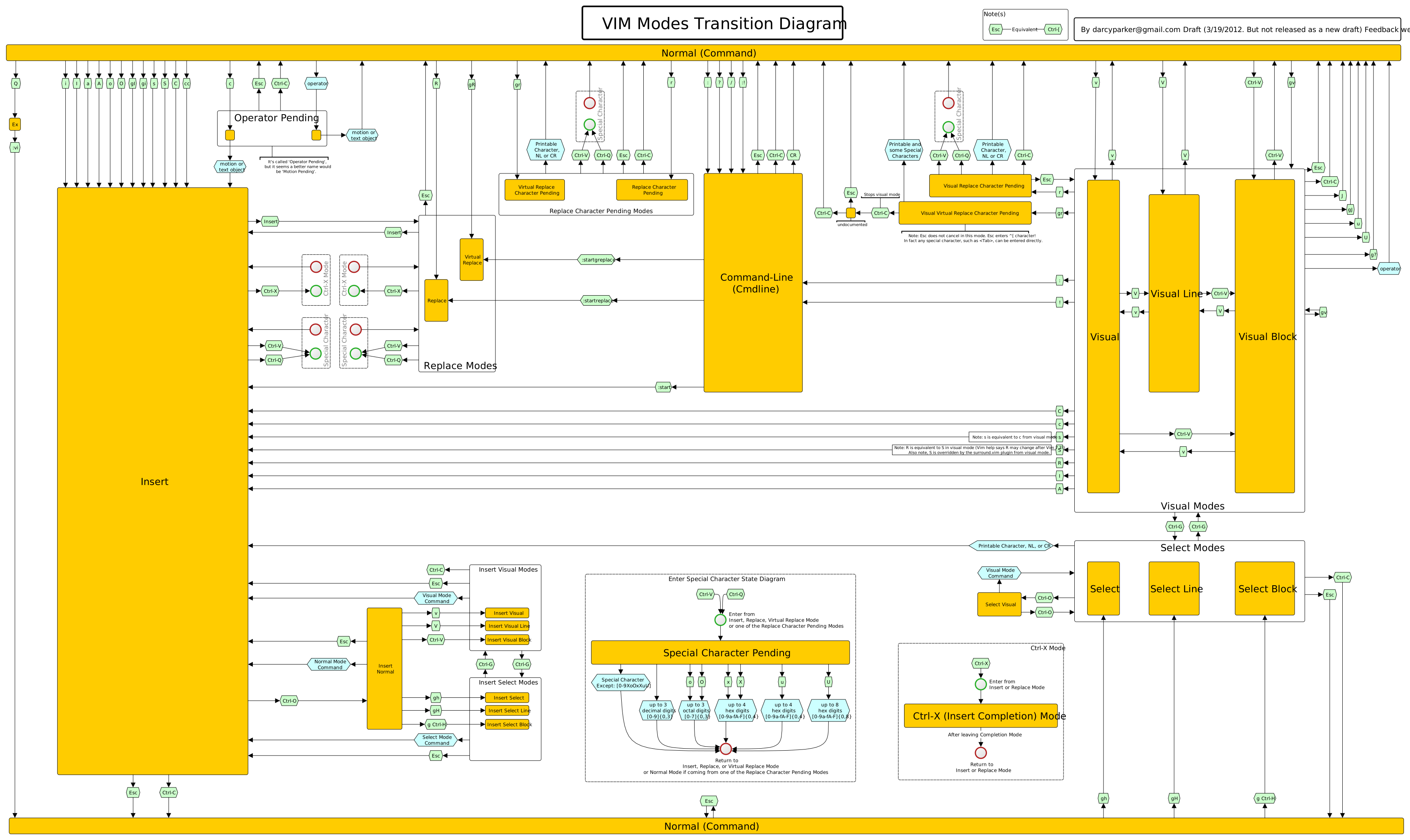
i found this map https://rawgit.com/darcyparker/1886716/raw/vimModeStateDiagr... , and kept hammering at it also started using vim everywhere


From an ex-Emacs/nvim and happy SublimeText user. Don't switch. Both (vim in particular) will eat a lot of your time to master and (Emacs in particular) to tweak. Ultimately, neither of these made me more productive. IMO there are so many better ways of spending the time :)


I found this game very helpful for solidifying my vim skills, and I would highly recommend it! https://vim-adventures.com/

It helped me to be a better vimmer, and it was fun too!


This is great!

I'm terrible at it.

But, this is great!


Use vim keybindings in intellij


Just stick with it. Both editors have tutorials built in. If you’re not getting anywhere with it in a month or two and enjoying the transition then stop. VSCode is just fine.


build your existing workflow from vscode in emacs or vim. do not adapt to it, adapt it to your current sota experience. this will take some effort, but it will pass, and be worth it.

nothing wrong with gui apps on macos/windows, but a terminal+browser setup on linux can be amazing.


Just go through the vim tutorial and use a vim extension for your favorite editor


1. Write cheatsheet while you learn.

2. Hang out in #vim :)


Guidelines | FAQ | Lists | API | Security | Legal | Apply to YC | Contact

Search: